The Data Collection Handbook · Part II. Getting the Data
Chapter 3. Choosing the Access Method
A team I worked with was collecting a retail catalog the hard way. Every night a fleet of real browsers opened product pages one at a time, waited for the scripts to finish painting the layout, and read the price back out of the finished page. It worked most nights. It also cost more in machine time than the rest of their data platform put together. The morning it broke, I opened one of those same product pages myself with the browser's developer tools showing, and watched the page ask its own server for the catalog: one request, clean structured data coming back, every field they were scraping and several they did not know existed. That door had been there the whole time. In public. Standing open. Cheaper and faster than the one they were using.
Nobody on that team was careless. They did what almost everyone does, which is to look at a website and see a website. What is actually in front of you is a building with several doors, and the one facing the street is rarely the cheapest way in. Chapter 1 introduced the five: the official API, the page HTML, the site's own hidden JSON API, the mobile app's API, and a full browser. The work is to find every door a given source exposes, score them, and then arrange them so the cheap ones carry the volume and the expensive ones only rescue what falls through.
The fifteen minute audit
Before a line of collection code gets written for a new source, I spend fifteen minutes with the site open and the browser's developer tools showing. Developer tools are built into every modern browser, usually behind the F12 key or an Inspect menu item, and the tab that matters here is Network, which lists every request a page makes while it loads. Fifteen minutes is not a figure of speech. This is where the time goes.
Two minutes on the paperwork. Look for published API documentation, read robots.txt, and check for a sitemap or an RSS feed. Chapter 2 covered robots.txt as a statement of preferences you are going to honor. It is also reconnaissance: the census in that chapter found that 162 of the top 500 domains use the file to advertise a sitemap, which is a machine-readable directory of the site's pages and the fastest way to learn what exists without crawling to find out.
Five minutes in the network tab. Reload the page with the tab open and filter to XHR and Fetch, the two labels browsers use for requests that JavaScript makes in the background rather than for images and stylesheets. Then use the site like a person: click a category, turn a page, sort by price. Watch for the request whose response carries the values you came for. When you find it, right click and choose Copy as cURL, which hands you the exact request as a command you can paste into a terminal. If it answers there, outside the browser, you have found a candidate for the hidden JSON API. Copy as cURL carries the browser's cookies and tokens along with it, so the real test is whether the request still answers without that session; if it does, most of the job is done.
Three minutes on the phone. Does the company ship a mobile app? Its endpoints are usually a separate door, often steadier than the website, sometimes carrying fields the web version never shows. Reaching it means inspecting the app's traffic rather than a page, and some apps sign their requests in ways that make this a project rather than an afternoon. Note it and move on; you are taking an inventory, not building anything yet.
Two minutes in view source. Not the inspector. This distinction costs teams weeks, so it is worth being exact. The inspector shows the page as it stands after every script has run. View source shows the document as the server sent it, before any script ran, and the Network tab's document entry shows the exact bytes of the load you just watched, which is the purer version of the same check. Search the raw response for a price you can see on screen. If it is there, one plain fetch gets you the data and you never need to render anything. If the raw response is a near empty shell and the numbers only appear after the scripts run, the data is arriving separately, which is your cue to go back to the network tab and find it.
Three minutes writing it down. List the doors you found, note which fields each one exposes, and mark the ones that need real work to reach. That list is the input to every decision that follows.
It is also the cheapest control I have ever put on a collection budget. When a build estimate or a vendor proposal reaches me without a door named, I send it back with this list as the ask, because an unnamed door defaults in practice to the browser, the one that always works, and the waterfall arithmetic later in this chapter prices that default at nearly thirty times the blended alternative.
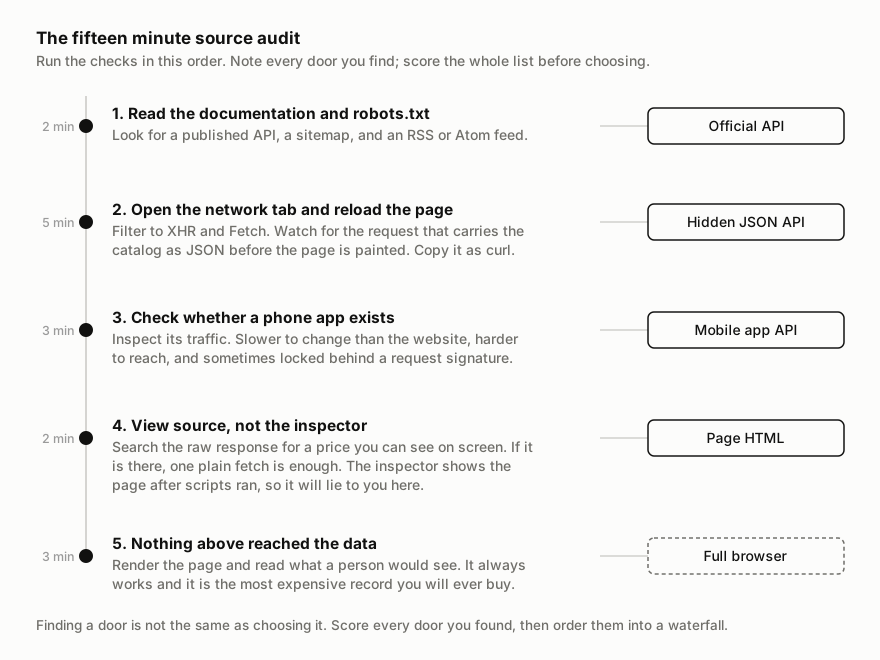
You leave the audit holding a list, and the list is not yet a choice. Two sources with identical doors can still deserve different answers, because the doors are not equally good at the thing you actually need.
Scoring what you found
Three axes decide it. Cost per record is what one delivered row costs to fetch through this door, counting bandwidth and machine time. Fragility is how often the door breaks on you, and more precisely, how often it breaks without telling you. Completeness is which fields the door exposes, which varies more than people expect: an official API can be missing the one number you came for, while the site's internal feed often carries stock levels and identifiers the visible page never prints. A fourth axis, effort to build, matters for planning but not for the choice, because it is paid once while the other three are paid on every record forever.
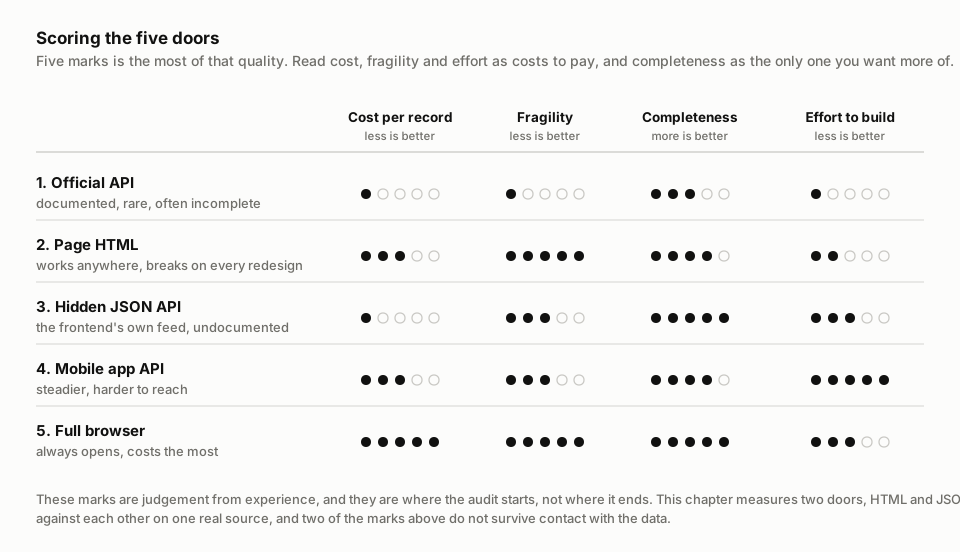
Those marks are my judgement after years of running collectors, which makes them a starting point and not evidence. So the rest of this chapter tests two of them.
Two doors, measured on one source
Hacker News publishes its listing of new stories two ways at once, which makes it a rare fair test bench. The HTML door is the page everyone knows, 30 stories at a time behind a More link. The JSON door is the site's documented search API, hosted on a separate domain, list shaped, fetched 100 stories per request in this run (it allows more), and returning nearly the same newest first walk. One note before the numbers: in this book's own vocabulary that makes it an official API rather than an undocumented frontend feed, and I chose it because it is list shaped the way a hidden feed would be. The redesign lesson below transfers to any JSON door; the pace and latency figures belong to this API's own limits. Hacker News also offers an item by item API that would need one request per story; using it here would rig the test against JSON, so the experiment does not. The job: collect the newest 500 stories through each door, extract the same seven fields from both, and record what each door charged. One page at a time, no concurrency, a truthful User-Agent, and every number below from the capture of July 30, 2026 that ships with this chapter.
The first attempt did not survive. Chapter 2's rule is that a declared crawl-delay wins, and Hacker News declares 30 seconds, so the collector waited exactly 30 seconds between pages. On the sixth page the site answered with status 429, too many requests, and a one word body: Sorry. I checked the obvious suspect first, the shared exit address, and cleared it; the same URL answered fine from the same address after a rest. Then I probed again at the same pace on a fresh walk and was refused on the fifth page, after 120 stories. Both refusals at the site's own published pace. Doubled to 60 seconds, the walk completed all 17 pages without complaint. The rate a site publishes and the rate it enforces are two different numbers, and you only learn the second one by being refused. The probe that reproduces this ships with the example.
With the pace settled, the doors separate fast. The JSON door needed 5 requests where the HTML door needed 17, and at the pace each source tolerates, that difference compounds into the whole story: 4.3 seconds against 16.1 minutes for the same 500 stories, 223 times faster. One asymmetry inside that comparison: the HTML pace was found by being refused, while the JSON pace is the API's documented ceiling, never probed to a refusal. Extraction took 13 lines of code against 28, resting on 8 structural assumptions against 12; the twelve HTML couplings are things a restyle can move, while the eight JSON couplings are field names that move only when the schema does.
Multiply that speed out before you promise anyone freshness. Pages needed times the pace the source tolerates is your delivery window, and the pace that counts is the enforced one the probe found, not the published one. Through this HTML door at 60 seconds a page, 50,000 records is about 27 hours of walking, which breaks a daily delivery promise before a line of code is written. Through the JSON door the same volume fits in minutes. I run this multiplication before a refresh commitment goes into any contract, mine or a vendor's, because a promise the window cannot hold fails on schedule, every day.
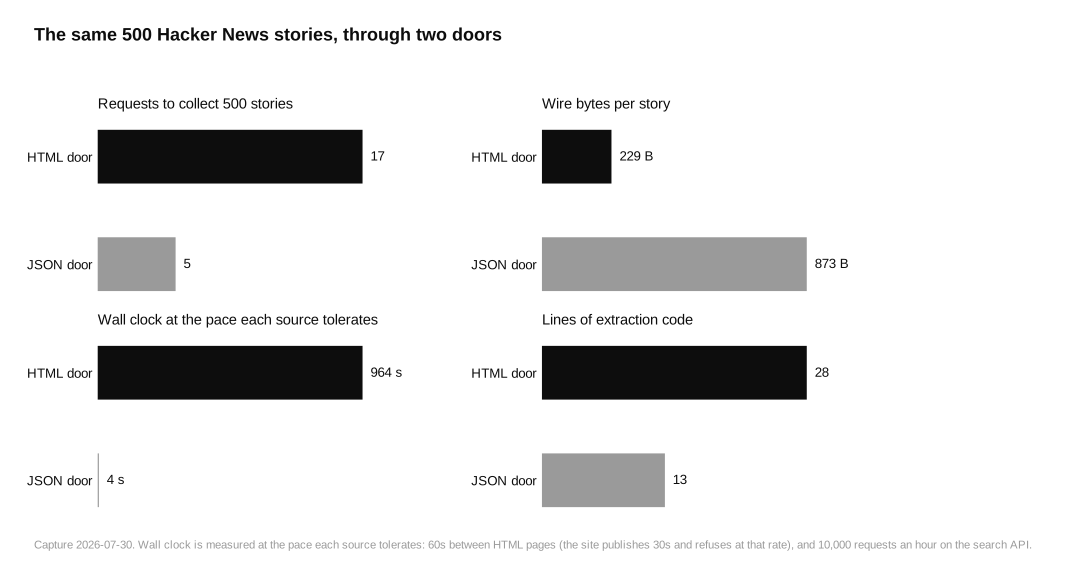
Now the parts my own brief got wrong. I wrote the hypothesis down before the run, so it gets judged by the result. I predicted the JSON door would answer several times faster per request. Backwards: the HTML door's median response was 176 milliseconds against 440, 2.5 times faster, a plain page cache beating a search engine doing real work per query. The 223x above is rate limits and page sizes, not server speed. I also predicted the JSON would be an order of magnitude lighter. Backwards again, on the wire: the HTML door moved 229 bytes per story and the JSON door 873, because Hacker News compresses its pages to a sixth of their size while the API answered uncompressed in this capture, compression requested and not applied, and pads every hit with search metadata. Only after decompression is the JSON lighter, 1.7 times, nowhere near an order of magnitude. If your proxies bill by the gigabyte, the door that is easier to parse can be the one that costs four times more bandwidth. I have priced collections for years and I would have gotten both of these wrong from the armchair.
The third prediction was that a layout redesign cannot break the JSON door, and the experiment backs it with a number I did not expect to be so lopsided. The test breaks both parsers on purpose: six restyle mutations, renamed CSS classes and moved attributes, the changes a redesign makes; then four data model mutations, renamed fields, the changes a schema revision makes. The restyle broke the HTML parser five ways out of six and the JSON parser zero, and the mechanism is visible by counting: of the 21 class names in the page, exactly one string coincides with anything in the JSON payload. There is nothing for a redesign to reach.
Then the same test cut the other way. Under the four data model mutations the JSON parser failed all four, and every failure landed in the quietest possible mode: records kept flowing with the renamed field silently empty. No crash, no zero row day, a green pipeline delivering rows with a hole in them. The HTML parser, tested against four markup changes of its own, failed two the same silent way. So the ledger reads: the JSON door breaks far less often, and when it does break, the failure is easier to miss. Completeness told a similar both ways story in miniature. Every field arrived 100 percent through both doors except one: the JSON reported no external link for the 14 self posts, 97.2 percent fill, while the HTML door papered over the same fact with an internal link. And of 498 stories both doors returned, titles, links, and authors matched at 100 percent, while points and comment counts disagreed on a handful, 99.0 and 99.6 percent, only because the two walks read live counters minutes apart. None of this decides itself without a monitor, and you have not built one yet; Chapter 8's per-field fill check is its first piece and Chapter 10 is the rest. What it decides right now is that no door exempts you from checking what arrived.
That silent partial is also the reason I now write one clause into every data contract, on either side of the table: acceptance is measured field by field, never by row count. A batch can arrive at full row count with its price column quietly empty, which is exactly how all four JSON failures above landed, and a buyer who accepts on row count has agreed to pay for holes. So the specification names each field and the fill rate it must hold against the last accepted batch. Picture a repricing team feeding on a competitor price column that silently went empty; the pipeline stays green and the reprices chase a ghost.
The waterfall
Every door fails sometimes. The cheap one hits a rate limit, the JSON feed changes shape on a routine deploy, the page you needed renders differently for one region. A collector built on a single door has that door's worst day as its own.
So keep several doors and put them in order. Send every record at the cheapest door that can serve it, and let only the failures fall to the next one down. This is a waterfall, and it is the most useful piece of collector architecture I know.
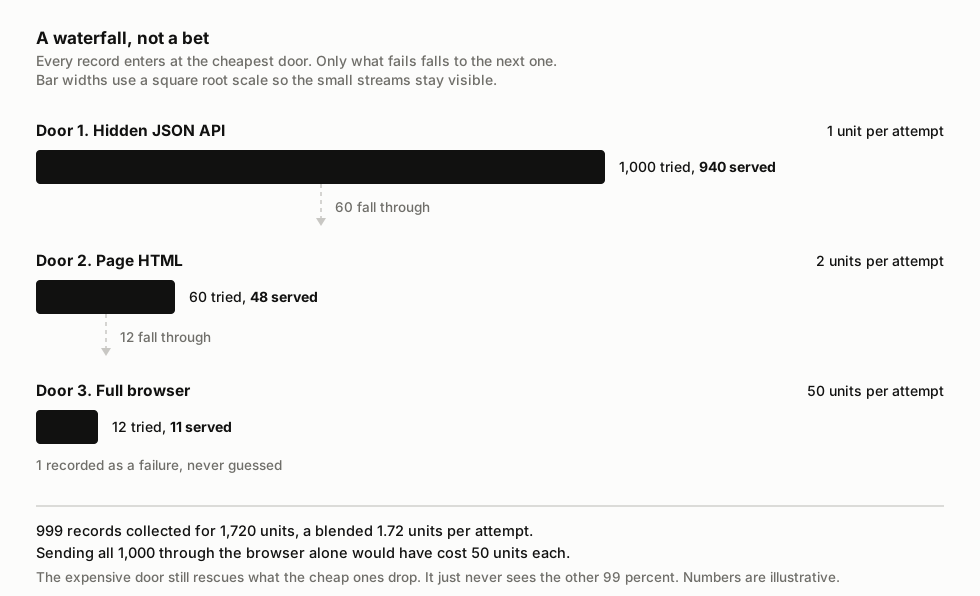
The arithmetic is why it matters. Put a thousand records through a waterfall where an attempt at the JSON door costs one unit, at the HTML door two, and at the browser fifty, with failed attempts charged like successful ones, because the source bills the attempt, not the outcome. If the cheap door serves 940 of them, the middle door serves 48 of the remaining 60, and the browser rescues 11 of the last 12, you have collected 999 records for 1,720 units, a blended 1.72 units per record. Sending all thousand through the browser would have cost fifty units each, about twenty-nine times as much, for one extra record. The expensive door still earns its place; it just never sees the other ninety nine percent of the volume.
One habit makes the waterfall measurable: record which door served each record, in the record. It costs one field, and it answers questions that are otherwise guesswork. When the share of records served by the cheap door starts sliding week over week, something changed at the source and you now have the date it started. When your proxy bill jumps, you can see whether volume grew or whether traffic migrated down the waterfall to the expensive doors. Without that field, a collector that has silently fallen back to rendering every page in a browser looks exactly like a collector that is working, right up until the invoice.
The doors also tend to fail for different reasons, which is the other reason a waterfall beats a single bet. A site redesign takes out the HTML door and leaves the JSON feed untouched. An API deprecation does the reverse. A shared outage or a block on your address takes every door at once, and no waterfall hedges that; it pays for itself on the far more common days when only one door closes. A rate limit hits whichever door is doing the volume, which is usually the cheap one, and the fallback absorbs the overflow while you fix it. Build the fallback even though it will rarely run. It is there so that the day the cheap door closes is an ordinary day.
When the browser is the right answer
The full browser is last in the waterfall, and it does belong there. There is a real minority of sources where nothing else reaches the data: the values are assembled by scripts from several requests, or they only appear after an interaction that is hard to reproduce by hand, or the shape of the internal feed changes often enough that maintaining a parser for it costs more than rendering the page. In those cases, render it. Using the browser there is not a failure of skill; it is an expensive tool used on purpose, on the fraction of the work that needs it.
What I argue against is reaching for it first, which is what that retail team had done. The browser has a gravitational pull because it always works: no reverse engineering, no hunting for endpoints, just open the page and read it. That certainty is genuinely worth paying for on the hard cases. Paying for it on every record, when the site's own frontend is fetching clean structured data that you could have asked for directly, is how a collection budget disappears into machine time with nothing to show for it.
There is one more argument for the browser that gets made and I do not accept: that rendering pages the way a person would is a way to look less like a collector. That is a detection question, and Chapter 5 takes it seriously on its own terms. It does not decide which door you collect through.
The experiment kept returning to one finding. Neither door was refused for being the wrong shape or the wrong software. One of them was refused for arriving too often from one address, at a pace the site itself had published as acceptable. The door you knock on is only half of what a source sees. The other half is where you are knocking from.
Run the experiment yourself. The complete example ships with this chapter: the data, run.py, pinned dependencies, and the written analysis. It runs offline on a laptop.
Download the code and data (1.7 MB) · then pip install -r requirements.txt and python run.py